Hypha
A Haskell-aware code/doc browser tuned for AI agents and humans alike.
AI agents don't browse Hackage. They fetch HTML pages and burn input tokens parsing chrome, navigation, and boilerplate just to find a signature or a Haddock paragraph. They also re-grep the local source tree on every follow-up question. Both are expensive.
hypha exists to make Haskell knowledge cheap to consume:
- Token economy. Every command emits compact, structured YAML by
default (or
--jsonfor machine pipelines). No HTML. Use--selectto drop the fields you don't need —hypha symbol … --select sig,haddockfor just the type and the docs — and--fullonly when you do. - Cache-aggressive, Hackage-friendly. Network responses are cached on
disk with ETag +
If-Modified-Sincerevalidation. The same project re-queried a thousand times produces a small handful of HTTP requests. The search index is persisted in SQLite and shared across every project on your machine — if two projects depend oncontainers-0.6.7, the second inherits the first's work. - Plan-aware, source-faithful. Reads your
dist-newstyle/cache/plan.jsonso answers reflect the exact versions you're building against — including your local project, and (in the doc-browser server) every caballibrary NAMEsub-library of every package in the plan. Symbols point to thefile:linewhere they're actually defined, not the re-export module — following a chain of re-exports across module and package boundaries, sobase's façades resolve intoghc-internal. CPP is preprocessed with the macros your build plan implies, so a#if-guarded declaration is read from the branch your compiler would compile; the few modules that still fail to parse are reported rather than guessed at. - One tool, two surfaces. The same library powers the CLI and the local doc-browser server, so agents and humans see the same data.
Where to next
- Installation — build from source or Nix.
- Quick Start — materialise a plan and run your first query.
- Claude Code Plugin — teach Claude to prefer
hypha. - Guide — identifier syntax, subcommands, flags, caching.
- Doc Browser Server — the visual surface.
- Design — the
cli-printing-pressethos and architecture.
Licensed under BSD-3-Clause.
Installation
hypha is a single cabal package producing two executables: hypha (the
CLI) and hypha-mcp (the MCP stdio shim).
From source (requires GHC ≥ 9.6; tested on 9.6.7, 9.10.3 and 9.12.4)
git clone https://github.com/well-typed/hypha.git
cd hypha
cabal build all
cabal install exe:hypha
cabal install exe:hypha-mcp
Nix (flakes)
The flake provides a development shell with GHC and cabal ready to go:
nix develop github:well-typed/hypha
cabal build all
There is no packaged hypha derivation yet, so nix run has nothing to
run — build it from the shell above.
Claude Code plugin
If you drive Claude Code, install the bundled plugin so Claude prefers
hypha over WebFetch and ad-hoc grep of ~/.cabal/store. It ships the
skill, slash commands, and an auto-registered hypha-mcp MCP server — see
Claude Code Plugin.
The plugin does not vendor the binaries. Install
hyphaandhypha-mcpper From source (or Nix) first, and make sure both are on your$PATH.
Quick Start
1. Materialise a build plan
hypha reads dist-newstyle/cache/plan.json to learn which versions your
project builds against. Generate it with a dry-run build:
cd /path/to/your-cabal-project
cabal build --dry-run        # writes dist-newstyle/cache/plan.json
2. Query a symbol — compact YAML
hypha symbol aeson/Data.Aeson/encode
actions:
  module_index: hypha module aeson/Data.Aeson
  package_info: hypha package aeson
  view_source: hypha source aeson/Data.Aeson/encode
result:
  haddock_raw: " Efficiently serialize a JSON value as a lazy 'L.ByteString'.\n\n This is implemented in terms of the 'ToJSON' class's 'toEncoding' method."
  kind: function
  module: Data.Aeson
  name: encode
  package: aeson
  signature: "encode :: (ToJSON a) => a -> L.ByteString"
  version: '2.2.5.0'
YAML is the default output: compact, readable in a terminal, and cheap
for an agent to parse. The top level is just result: (the answer) and
actions: (suggested follow-up commands). Keys are emitted in sorted
order, which is why actions: comes first — do not rely on field order,
rely on the field names.
A symbol whose definition lives in another module gains a defined_in:
block naming it; encode is declared where it is exported, so there is
none here.
3. Project only the fields you need
hypha symbol async/Control.Concurrent.Async/concurrently --select signature,haddock
--select post-filters the output to the listed fields; --full opts into
every field. See Global Flags.
4. JSON for machine pipelines
When a downstream tool wants JSON, opt in with --json:
hypha symbol async/Control.Concurrent.Async/concurrently --json
Next steps
- Learn the Identifier Syntax (
pkg,pkg-version, module, symbol). - Browse all Subcommands.
- Use
hypha lookupwhen you don't know which package provides a name or type.
Claude Code Plugin
hypha ships as a Claude Code plugin
that auto-loads a skill teaching Claude to prefer the hypha CLI over
WebFetch on hackage.haskell.org / hoogle.haskell.org and over ad-hoc
grepping of ~/.cabal/store. The plugin lives at the root of this repo
(.claude-plugin/{plugin,marketplace}.json + skills/hypha-haskell/SKILL.md).
Prerequisite: the hypha and hypha-mcp binaries must already be on
$PATH — install per Installation first. The plugin
ships skill content, slash commands, and an mcpServers declaration that
auto-registers hypha-mcp with Claude Code on install; it does not
vendor the binaries themselves.
Option A — install from the Well-Typed marketplace (recommended)
Inside a Claude Code session:
/plugin marketplace add https://github.com/well-typed/hypha.git
/plugin install hypha@well-typed
The first command opens an interactive TUI prompting you to confirm the marketplace add. Accept it, then run the second command.
Option B — install from a local clone
If you already have the repo checked out (e.g. for development):
/plugin marketplace add /absolute/path/to/hypha
/plugin install hypha@well-typed
Use the absolute path; Claude Code resolves the marketplace from the
directory's .claude-plugin/marketplace.json.
Verify the install
/plugin list
You should see hypha@well-typed enabled. Open any .hs or .cabal file
and Claude will auto-trigger the hypha-haskell skill on the next Haskell
question. The /hypha-lookup <symbol-or-signature> slash command becomes
available too.
Uninstall
/plugin uninstall hypha@well-typed
/plugin marketplace remove well-typed
Identifier Syntax
Most subcommands take a single identifier that names a package, module, or symbol:
<pkg>[-<version>][/<Module.Path>][/<symbol>]
The version is optional and attaches with a hyphen (the usual Haskell
name-version convention). A bare name resolves to whatever the plan /
store / Hackage considers current.
Examples:
async— package (current version)async-2.2.6— version-pinned packageasync-2.2.6/Control.Concurrent.Async— moduleasync-2.2.6/Control.Concurrent.Async/concurrently— symbolasync/Control.Concurrent.Async/concurrently— same symbol, unpinnedmy-project/MyProject.Internal/helper— a symbol from the local project
Version detection. A trailing segment is treated as a version only when it looks like one (digits and dots). So a hyphenated package name such as
my-projectis parsed as a whole name, whileasync-2.2.6splits into nameasync+ version2.2.6. A cabal store hash suffix (async-2.2.6-<hash>) is recognised and stripped automatically.
Note: the
@versionform is not accepted — use the hyphen.
Sub-libraries
The doc-browser server addresses sublibs as
pkg:sublib in URLs (e.g. /pkg/happy-lib:frontend). The CLI path does
not yet handle the :<sublib> suffix in identifier arguments — that's
planned. For now, query a sublib by browsing it in the server UI.
Subcommands
Every subcommand takes an identifier and honours the global flags.
| Command | Args | Purpose |
|---|---|---|
lookup | QUERY | Tiered symbol resolution — see Looking Up Symbols |
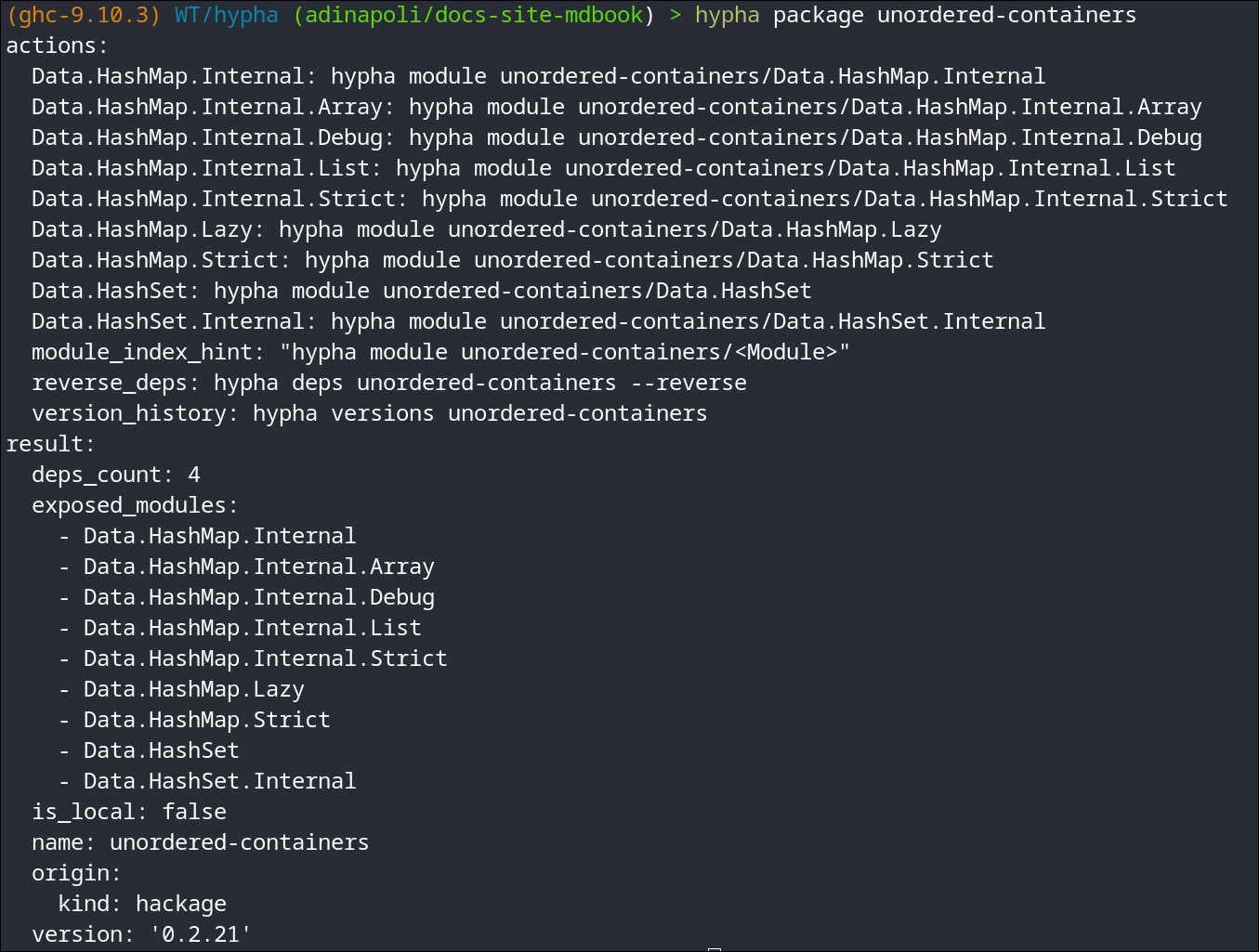
package | <pkg>[-ver] | Package metadata (name, version, exposed modules) |
module | <pkg>/<Mod> | Exported symbols with signatures |
symbol | <pkg>/<Mod>/<sym> | Full info: signature, Haddock, source coords |
source | <pkg>/<Mod>/<sym> or <pkg>/<Mod> | Source slice |
versions | <pkg> | Version history on Hackage, plan-pinned marker |
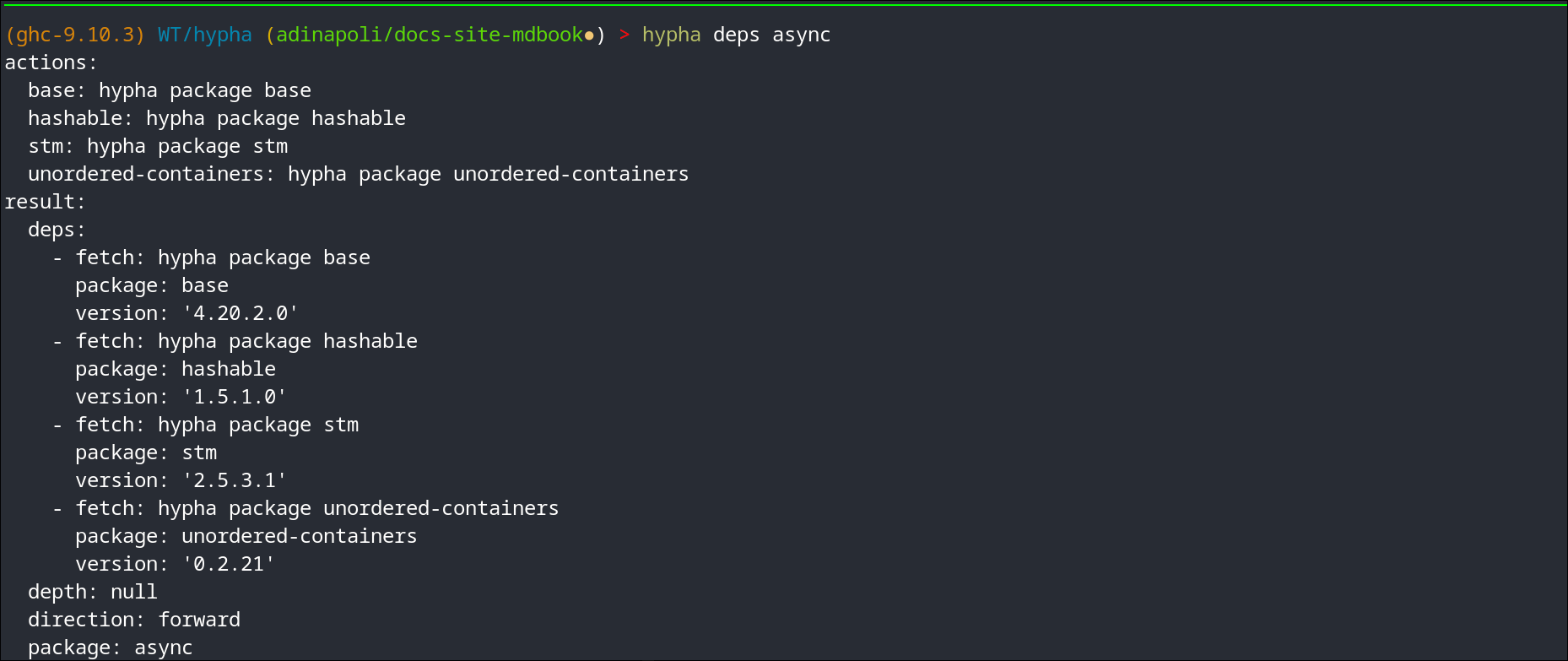
deps | <pkg> [--reverse] [--depth N] | Forward/reverse deps within the plan |
doctor | — | Environment health check |
server | [--port N] [--bind H:P] [--prebuild] | Doc-browser HTTP server |
source resolves a symbol through its component's export lists, so a
re-exported name lands on its declaration rather than on whichever
same-named binding the package happens to enumerate first —
Data.Map.Strict.insertWith used to come back as
Data/IntMap/Internal.hs. A package whose .cabal cannot be read falls
back to a package-wide scan and says so on stderr.
MCP. There is no
hypha mcpsubcommand. The MCP surface is a separate binary,hypha-mcp— see MCP Host Integration.
Each command emits a structured envelope (result: + actions:) in YAML by
default. See Global Flags for --json, --select, and --full.
Looking Up Symbols (hypha lookup)
hypha lookup is the single entry point for the question "which
package/module provides this?" It runs a three-tier short-circuit cascade
and returns at the first hit:
-
PackageCache(SQLite): exact-name + qualified-name lookup — e.g. bothlookupandData.Map.lookup. Indexes top-level declarations, class methods, data constructors and record fields alike. What it does not cover is a module that will not parse even after preprocessing: such a module contributes no rows, so a symbol only that module presents falls through to the tiers below — see Troubleshooting. Tier 1 is also empty for one background pass after an index-format upgrade — see Caching.This tier is pinned to your build plan. The SQLite cache is keyed on
(package, version)and shared by every project on the host, so it accumulates versions no single project builds against. Tier 1 answers only at the versions yourplan.jsonpins — or that--package-overridesets — and every provider reports the version it came from. Outside a cabal project there is no plan to pin to and the whole cache answers instead; hypha says so on stderr. -
Local Hoogle DB at
<project>/.hypha/hoogle.hoo: built lazily from scavenged store*.txtfiles plus on-demandhaddock --hooglefor local packages. Handles type-signature queries such asa -> Maybe a. -
Remote Hoogle at
hoogle.haskell.org: HTTP fallback. Cached in the globalkvtable; under--offlinea cached answer is still served, only the network call is skipped. Its request timeout is 10s, raisable with--hoogle-timeout SECONDS.This is the only tier that reaches beyond your build plan, and it is how you find a package you do not yet depend on. The
tierfield on each provider is what tells you how far an answer had to reach:cacheandlocal-hoogleare your project,remote-hoogleis all of Hackage.
hypha lookup lookup
hypha lookup 'a -> Maybe a'
hypha lookup always emits a structured envelope. Failures carry a code
(NOT_FOUND, HOOGLE_OFFLINE, HOOGLE_REMOTE_ERROR) and an actions map
suggesting how to retry. See Exit Codes for how those map
to process exit status.
Global Flags
These apply to every subcommand and are given before or after the command.
| Flag | Description |
|---|---|
--project-dir DIR | Override project root |
--package-override PKG=VER | Replace a plan entry (repeatable) |
--offline | Disable network access; a remote-Hoogle answer cached by a previous online lookup is still served, only the request is skipped (fails only if nothing is cached) |
--json | Emit the JSON envelope instead of YAML (the default) |
--pretty-json | Indent JSON output |
--full | Include all fields (default: compact) |
--select f1,f2,... | Post-filter output to the listed fields |
--cache-dir DIR | Override the cache root (default: XDG, ~/.cache/hypha) |
--hoogle-timeout SECONDS | Remote Hoogle request timeout (default: 10) |
--version / -V | Print the hypha version and exit |
--quiet / -q | Suppress informational output; overrides --verbose. Does not suppress the indexer's and the browser's diagnostics — a skipped module, an export it could not resolve, a cabal file it could not read — which always go to stderr |
--verbose / -v | Show debug output |
Output format
YAML is the default — compact, terminal-readable, and cheap for an agent to
parse. --json switches to a JSON envelope for machine pipelines;
--pretty-json indents it.
-
--fulladds the fields the compact form omits. Today that issource(thepathandlinea symbol is defined at) onsymbol, andtiers_consultedonlookup— the default already carries the full Haddock body, so--fullis a small addition rather than a different mode. -
--selecttrims the output to just the fields you name, e.g.hypha symbol … --select signature,haddock. Great for keeping token cost down. The short spellingssigandhaddockmean the same fields (they are aliases forsignatureandhaddock_raw), so--select sig,haddockworks too.It names top-level result fields, so which names are valid depends on the command:
signatureandhaddock_rawarehypha symbol's. A name no command produces selects nothing —hypha lookup … --select siganswers with an empty result, becauselookup's signatures live one level down, inside each entry ofproviders.lookup's own top-level fields arequeryandproviders(plustiers_consultedunder--full), and its default output is already compact.You do not have to guess: a name the command cannot answer is reported on stderr, along with the ones it can.
$ hypha lookup encode --select sig
warning: --select names no field of 'lookup': signature; this command
answers with providers, query (more under --full)
See Caching for what --cache-dir and --offline control.
Exit Codes
Every failure hypha itself reports is classifiable from the process exit
status alone — no need to parse error text. Success envelopes exit 0;
failures carry a stable code in the envelope and a typed exit status:
| Code | Meaning |
|---|---|
0 | Success |
1 | Argument parsing failed before hypha ran — unknown subcommand, unknown flag, missing required argument. See below. |
2 | User error (bad args, malformed path, non-loopback bind) |
3 | Not found (symbol/package absent across plan → store → Hackage) |
4 | Network error (offline cache miss, HTTP 429/503, transport failure) |
5 | Cache / on-disk corruption |
7 | Environment error (no plan.json, unreachable store) |
8 | Tool missing — a required external binary (haddock, cabal, ghc) is not on $PATH |
9 | Internal error — an exception escaped hypha's own error handling. A bug; the envelope carries INTERNAL_ERROR. |
1 versus 2
1 comes from the argument parser, before any command runs, and so is the
one code with no envelope on stdout — the usage message goes to stderr
instead. 2 is hypha's own validation of an argument it did parse:
$ hypha nosuchcommand      # unknown subcommand      -> 1, usage on stderr
$ hypha --nosuchflag       # unknown flag            -> 1, usage on stderr
$ hypha package            # missing required arg    -> 1, usage on stderr
$ hypha symbol not-a-path  # malformed identifier    -> 2, error envelope
An agent that branches on the envelope should treat 1 as "I called hypha
wrong" and re-read --help, not as a failure of the query.
If you are seeing 8 (TOOL_MISSING) unexpectedly, you are probably
running under a sandbox that hides the toolchain — see
Troubleshooting.
Caching
hypha caches everything network-shaped — and as much of the plan-shaped
derived state as possible — under $XDG_CACHE_HOME/hypha/ (defaults to
~/.cache/hypha/, overridable with --cache-dir).
| Cache | Layout | Freshness |
|---|---|---|
| Search index | hypha.db (SQLite, WAL) | Keyed on (component, version, unit-id) and on a row-format generation (index_format, currently 6), shared across every project on the host |
| Hackage HTTP responses | hackage/<sha256>.json | ETag + If-Modified-Since revalidation; 15 min TTL per entry |
| Source tarballs | source/<pkg>-<ver>/ | Immutable once extracted |
| Haddock HTML | haddock/<pkg>-<ver>/ | Built on demand, reused across runs |
| Hoogle DB | <projectRoot>/.hypha/hoogle.hoo (with .hypha/hoogle-stamp sibling) | Rebuilt when plan.json changes |
| Remote-Hoogle query bodies | kv table of ~/.cache/hypha/hypha.db | No TTL: every successful remote lookup is kept and served even under --offline; cleared only by deleting ~/.cache/hypha (negative-caching/TTL policy tracked in issue #40) |
The fallback chain is automatic for network reads: local HTTP cache → build plan → cabal store → Hackage.
What "the same package" means
The index is shared across every project on the host, so it has to be precise about when two projects are talking about the same thing. Sharing is keyed on cabal's unit-id — its hash of the compiler, the resolved dependency versions and the flag assignment — not on the package version alone.
That distinction is not pedantry. A package's own source decides what it exports by asking about its dependencies:
#if MIN_VERSION_text(2,0,0)
import Data.Text.Internal.Encoding.Utf8 (utf8LengthByLeader)
#else
import Data.Text.Internal.Encoding.Utf16 (chr2)
#endif
attoparsec-0.14.4 built against text-2.1 and the same version built
against text-1.2.5 are different row sets, and 18 of its modules gate on
MIN_VERSION_* like this. So:
- Two projects that resolve a package identically share the indexed rows: the second one starts warm.
- Two projects that resolve it differently each keep their own rows, and each sees only its own. Neither re-indexes because of the other.
- Up to three configurations of one
(component, version)are kept; the least recently indexed is dropped beyond that. A dropped configuration costs one re-index, never a wrong answer.
A --package-override PKG=VER names a version your plan does not build,
so cabal never resolved a unit-id for it; those reads match on the version
instead.
Project-local cache layout
| Path | Purpose |
|---|---|
~/.cache/hypha/hypha.db | Global SQLite cache: store-package symbol index + remote-Hoogle KV cache |
~/.cache/hypha/hoogle-txt/ | Scratch dir for haddock --hoogle outputs |
~/.cache/hypha/cpp-macros/ | Synthesised cabal_macros.h per plan, named by content hash |
<project>/.hypha/cache.db | Project SQLite cache: local + SRP package symbol index |
<project>/.hypha/hoogle.hoo | Project Hoogle DB |
<project>/.hypha/hoogle-stamp | Plan-hash + aggregate-fingerprint stamp |
<project>/.hypha/hoogle-input/ | Symlinks / copies of the .txt files fed to hoogle generate |
Index format generations
The row format is versioned. When hypha opens a hypha.db written by an
older build it clears the index outright rather than migrating it: an old
row's module name may have been derived from a file path, its signature
may have been matched by name rather than read at the definition site, or
that signature may have been sliced out of the source span and so carry a
per-argument Haddock comment as though it were part of the type — and
or it may have been read from the wrong side of a
#if __GLASGOW_HASKELL__ gate, because the macros cabal defines for a
build were not supplied — and none of those defects is detectable row by
row, so the choice is re-index or lie. Generation 6 is the exception
that proves the rule: nothing was wrong with generation 5's rows, but
the tables gained the unit_id column that keys them, and SQLite cannot
alter a primary key in place.
Expect one full background re-index the first time you run a new hypha
version (a few minutes for a large plan). While it runs, hypha server's
search is briefly empty and hypha lookup falls through to Hoogle.
Nothing needs to be deleted by hand.
Forcing a rebuild
No invalidate subcommand is shipped (agents would footgun). To force a
rebuild, delete the cache directory:
rm -rf <project>/.hypha     # project-only
rm -rf ~/.cache/hypha       # global
Doc Browser Server
hypha server is a loopback-only doc browser built on the same data as the
CLI, but with a visual surface humans can scan quickly. The first run pays
the indexing cost; every subsequent run hits the SQLite cache and renders
results on the first keystroke.
$ hypha server --port 4287
hypha server listening on http://127.0.0.1:4287

Highlights
-
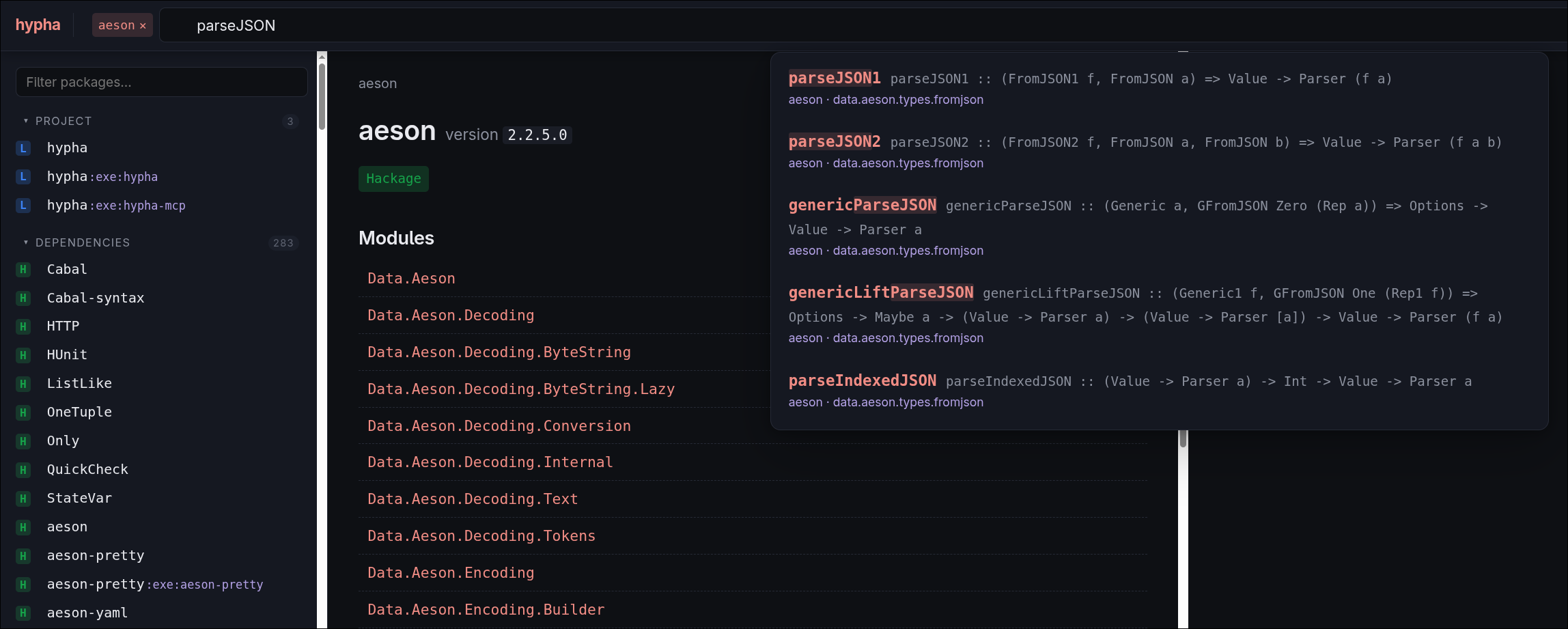
Command-palette fuzzy search. Type
Data.Map lookuporData.Map.Strict.lookup— FZF/Telescope-style tokenised matching ranks the canonical symbol first. The dropdown is centered under the search bar and works the same on every page.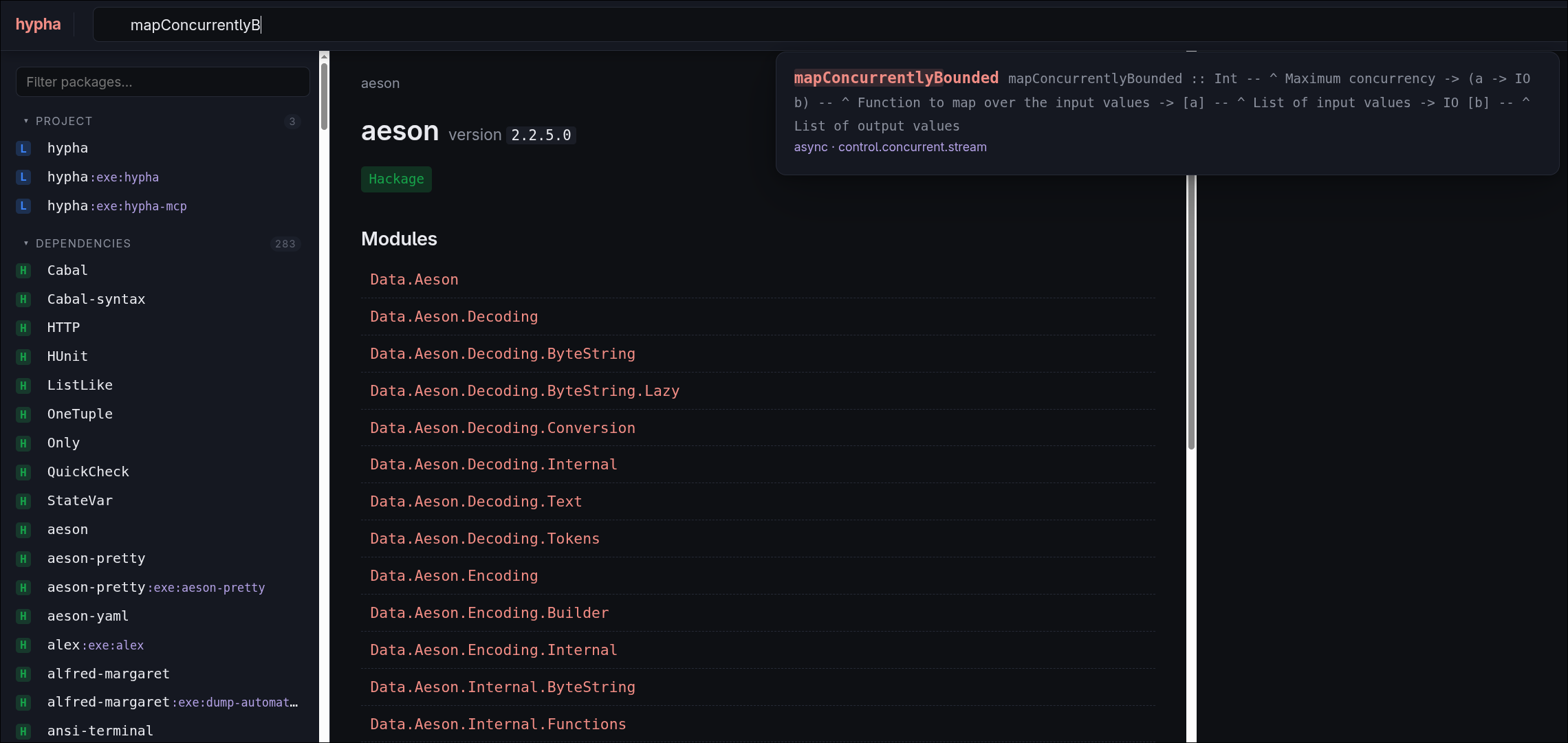
-
One result per definition. Rows that share a definition site collapse into a single hit —
Data.Traversable.mapAccumLandGHC.Internal.Data.Traversable.mapAccumLare one result, not two — with the most public presentation winning. Nothing is hidden: a+Nbadge opens a list naming every package and module that was folded in, each a link, with the defining one tagged.Data.Map.Strict.insertWithandData.Map.Lazy.insertWithstay two results, because they have different definitions. To search one package, click the "in<pkg>" toggle next to the search box on any page inside a package, or typepkg:<name>and a space on any page, which turns the token into that toggle (pkg:aeson decode). The scope applies before the fold, so a definition two packages present still appears under either. -
Packages and modules are results too, ranked above the symbols beneath them: typing
containerslands the package page, typingData.Map.Strictlands the module page. -
Live build-progress feedback. A slim accent-coloured progress bar at the top of the page shows how many packages remain to index. A shimmering "Building the docs…" placeholder fills the dropdown until the index is warm.
-
Façade modules are no longer empty. A module that only re-exports —
Data.Traversable,Prelude,Data.Map.Strict— lists its entries with real signatures and Haddock, each taggedfrom <Module>(orfrom <pkg>:<Module>when the definition lives in a dependency) and linking there. Resolution goes through the search index, so a symbol re-exported through two or more modules still lands on its declaration rather than on the module that merely passes it along. -
Faithful symbol cards. Multi-line signatures are joined, Haddock comes from the GHC parse tree — so a doc block separated from its declaration by a blank line still binds correctly — and is rendered to HTML (paragraphs,
<code>,<pre>code blocks, lists, links). Every link is built from the component that defines the symbol, which may be a different package from the one in the URL. A card that could not read a signature says so instead of rendering an empty box.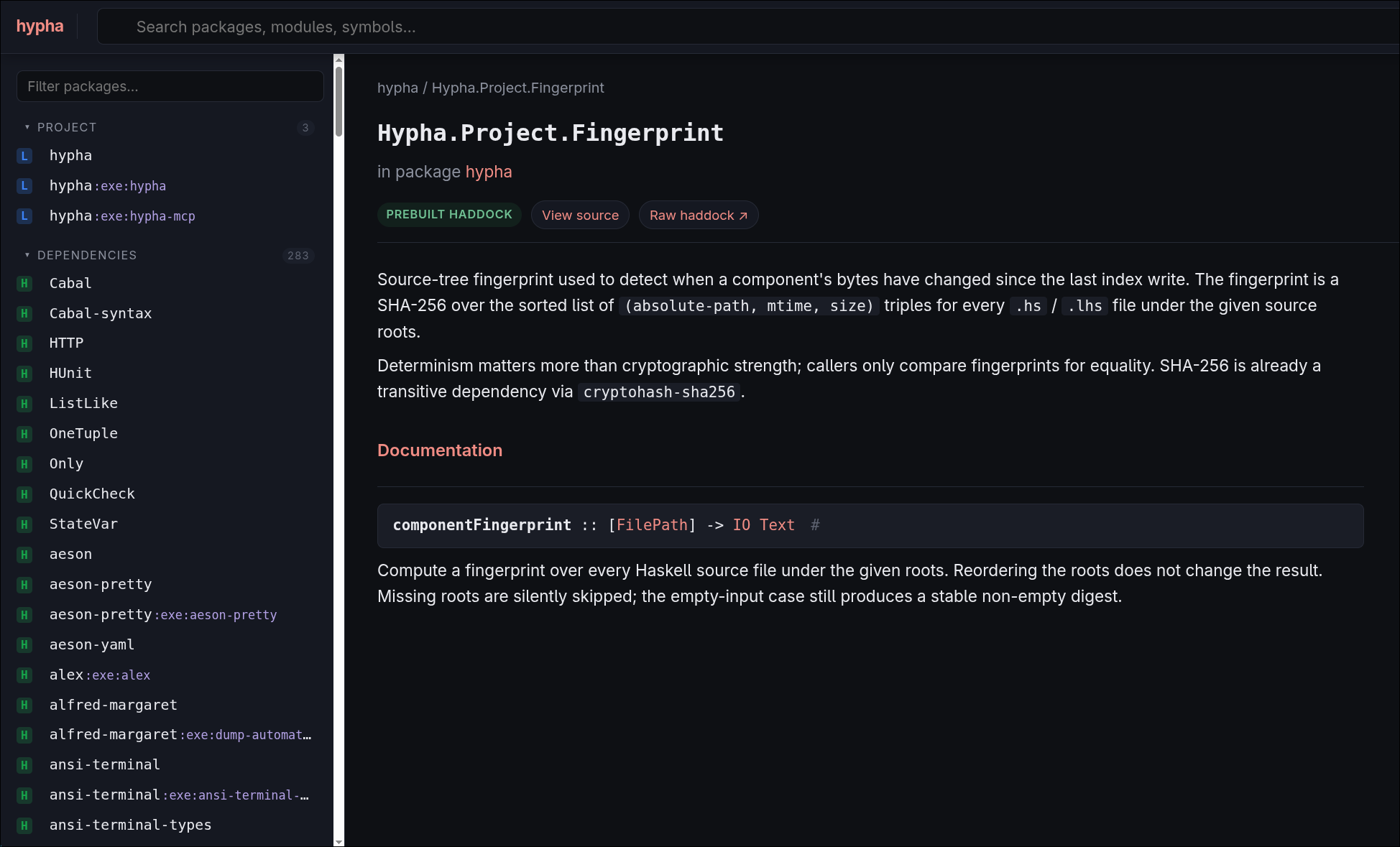
-
Skylighting-rendered source view with a
?line=Nscroll target.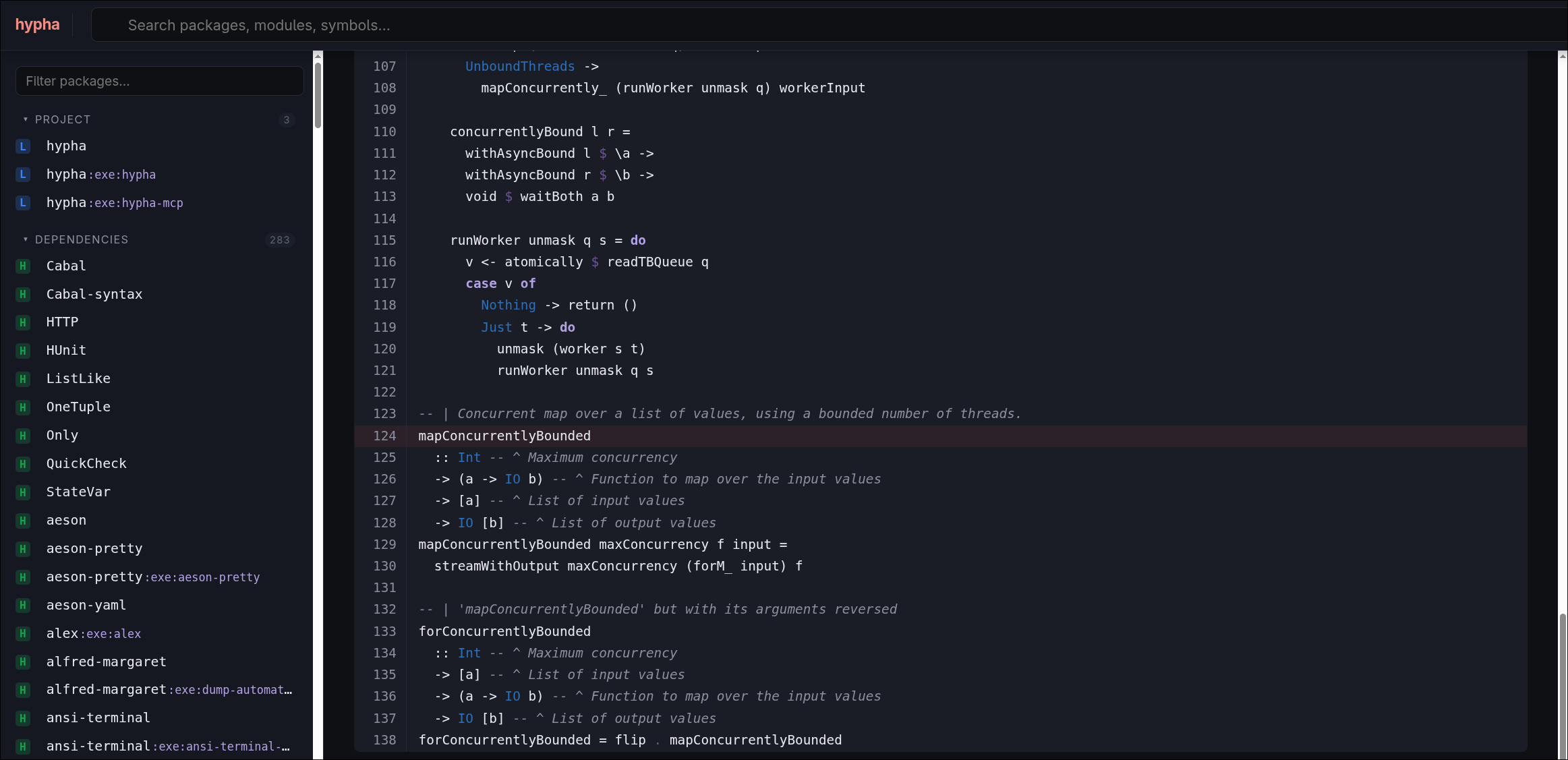
-
Private libraries. Sublibs appear as separate sidebar entries — a package's main library under its own name, a sublibrary as
pkg:sublib(e.g.happy-lib:frontend) — each with their own pages and search scope.
See Endpoints & Flags for the full HTTP surface and command-line options.
Endpoints & Flags
Command-line flags
| Flag | Default | Purpose |
|---|---|---|
--port N | 4287 | Loopback port to bind |
--bind HOST:PORT | 127.0.0.1:<port> | Explicit loopback bind (localhost, 127.0.0.1, or ::1) |
--prebuild | off | Render Haddocks for every plan package up front |
--prebuild-jobs N | 4 | Maximum concurrent prebuild workers |
Non-loopback binds (e.g. 0.0.0.0:4287) are refused with
exit code 2. There is no remote-access flag —
sharing is out of scope on purpose.
Endpoints
| Path | Returns |
|---|---|
/ | HTML shell with sidebar + search |
/search?q=...[&pkg=<component>] | HTMX results fragment: fuzzy ranked, and collapsed to one hit per definition. pkg scopes to a single component and is applied before the fold, so a symbol two packages present still appears under either |
/progress | HTMX progress-bar fragment (self-polling) |
/pkg/<pkg> or /pkg/<pkg>:<sublib> | Package / sublib overview |
/pkg/<pkg>/<Mod> | Module page, re-exported entries included |
/pkg/<pkg>/<Mod>/<sym> | Symbol card |
/source/<pkg>/<Mod> | Highlighted source |
/haddock/<pkg>-<ver>/... | Rewritten Haddock HTML |
/healthz | ok (plain text) |
Links out of a module page or a symbol card may name a different component
from the one in the URL: a re-exported symbol is documented where it is
defined, and that can be another package (base's Data.Traversable
resolves into ghc-internal).
MCP Host Integration
hypha-mcp is a thin JSON-RPC 2.0 stdio shim (a separate binary from the
hypha CLI). It exposes one MCP tool per CLI subcommand — hypha.lookup,
hypha.package, hypha.module, hypha.symbol, hypha.source,
hypha.versions, hypha.deps, hypha.doctor — each with a structured
input schema that IDE clients can render as a form. A generic hypha.exec
tool remains as an escape hatch for argv-level invocation.
Prefer the CLI where you can. Per cli-printing-press, agents in a shell-capable harness should call
hyphadirectly viaBash/ equivalent, not via MCP. The MCP surface exists for IDE auto-discovery (Claude Desktop, Cursor) and for harnesses without a shell.
If your AI harness doesn't support Claude plugins, add hypha-mcp as an MCP
client directly.
Claude Code
If you installed the Claude Code plugin,
hypha-mcp is registered for you on /plugin install — no manual config
needed. To wire it up manually, add to ~/.claude.json:
{
  "mcpServers": {
    "hypha": {
      "command": "hypha-mcp",
      "args": []
    }
  }
}
opencode
In opencode.json:
{
  "mcp": {
    "hypha": {
      "type": "local",
      "command": ["hypha-mcp"]
    }
  }
}
Generic MCP client
Point any MCP-compatible host at the hypha-mcp executable over stdio. It
speaks JSON-RPC 2.0 and exposes the tools described above, including the
hypha.exec escape hatch.
Philosophy: cli-printing-press
hypha is built to the principles laid out in
cli-printing-press — a
manifesto for agent-native CLIs. The relevant tenets and how hypha
honours them:
| cli-pp principle | hypha |
|---|---|
| Agent-native by default | Compact YAML is the default; --json is opt-in for pipelines. |
| Typed exit codes | 0 success, 2 user error, 3 not found, 4 network, 5 cache corruption, 7 environment, 8 tool missing — every failure is classifiable without parsing error text. |
| Local-first data layer | SQLite caches (per-project + shared global), an on-disk Hoogle DB, ETag-revalidated Hackage HTTP cache, and a fuzzy index — all built so repeat queries stay off the network. |
| Compact mode for tokens | Compact YAML is the default; --select f1,f2 projects fields; --full is opt-in. --json for machine pipelines. No HTML noise. |
| Human + machine output modes | YAML for agents/terminals, --json for pipelines, HTMX-rendered HTML for the server UI — same data, three surfaces. |
| Actionable errors | Every failure envelope carries a stable code and an actions map suggesting the next command to try. |
| Verified, not vibes | Property tests via falsify, golden output regressions via tasty-golden, edge cases via tasty-hunit. CI gates merges. |
| Non-obvious insight | Symbols resolve to the canonical declaration across re-exports — through several modules, and into another package, so base's façades resolve into ghc-internal — which is the value raw Hackage HTML cannot give you. CPP is preprocessed with the macros the build plan implies, so #if-guarded code is read from the branch your compiler would compile rather than from whichever branch an empty macro environment happened to select; the few modules that still fail to parse are reported rather than guessed at. |
| Dual interface from one spec | The hypha CLI, the hypha-mcp JSON-RPC shim, and the hypha server HTML UI share one library — no duplicated client/store code. |
CLI vs MCP — the cli-pp split
cli-printing-press is explicit that CLIs win for agents (cheaper tokens,
native to shell-trained LLMs) and MCP wins for IDE auto-discovery.
hypha follows that split:
- Agents should call
hyphadirectly through a shell tool. The Claude Code skill (skills/hypha-haskell/SKILL.md) tells the model to preferBash hypha …over the MCP tools. hypha-mcpexists for IDE/MCP-only harnesses (Claude Desktop, Cursor, opencode without a shell). It exposes one MCP tool per CLI subcommand (hypha.lookup,hypha.symbol, …) so IDE auto-discovery surfaces structured arguments; the generichypha.execremains as an escape hatch. See MCP Host Integration.
Architecture
hypha is a single cabal package with one library plus two executables.
Effects are records-of-functions parameterized over m, wired into
ReaderT Env IO — no effect library, no typeclass effect machinery.
hypha .............. CLI entry point
hypha-mcp .......... MCP/stdio shim (Pattern B: shells out to hypha CLI)
library: hypha
  ├── BuildEnv ....... Cabal store + Nix store + composition
  ├── Project ........ plan.json → BuildPlan + per-package components
  ├── Hoogle ......... Per-project DB + freshness via hoogle-stamp
  ├── Hackage ........ JSON API + ETag/Last-Modified cache
  ├── Search ......... Index (typed rows carrying a definition site),
  │                    Indexer (the build pass), Reexport (resolution
  │                    within a component), Exports (the cross-package
  │                    environment), Collapse (one result per definition),
  │                    Cache / PackageCache (SQLite, WAL), Fuzzy (FZF-style
  │                    scorer)
  ├── Source ......... Extensions (language settings from pragmas + cabal),
  │                    Parser / Interface (GHC parse tree → declarations,
  │                    exports, imports), Extract (docs and entries),
  │                    Locate (definition sites)
  ├── Output ......... Compact/full YAML (default) + JSON envelope, --select
  └── Server ......... HTMX-driven doc browser with command-palette UX
For full details see the design specs in the repository, under
docs/superpowers/.
Development
git clone https://github.com/well-typed/hypha.git
cd hypha
cabal build all
cabal test all
Tests use falsify for property testing, tasty-golden for output
regression testing, and tasty-hunit for specific edge cases.
Troubleshooting
Non-UTF-8 locale
GHC derives every Handle's encoding from the process locale. Under C or
POSIX — the default in bare containers, where LANG is simply unset — that
encoding is ASCII, and any non-ASCII character becomes a hard IOError. This
bites when building hypha; hypha itself is immune (see below).
Building hypha fails in ghc-lib-parser:
happy: compiler/GHC/Parser.y: hGetContents: invalid argument (cannot decode byte sequence starting from 226)
happy cannot decode the grammar. Byte 226 is 0xE2, the first byte of
∷ (U+2237), which appears in the GHC 9.12 series' Parser.y via
EpUniToken "::" "∷". Nothing is wrong with the download — the file is valid
UTF-8 that an ASCII decoder refuses to read.
Fix. Give the build a UTF-8 locale:
export LANG=C.UTF-8
C.UTF-8 is available in every modern glibc image and needs no locale-gen.
Prefer setting LANG over LC_ALL, so you don't clobber your other locale
categories. hypha's own CI and its Nix devshell both set it for exactly this
reason.
Running hypha needs no locale setup. Up to 0.2.0 it inherited the same problem and died on its own output:
hypha: <stdout>: commitBuffer: invalid argument (cannot encode character '\8212')
Since then both binaries pin UTF-8 on their handles, on the filesystem
encoding, and on every handle they open, before printing anything
(issue #9). The
locale was never the right authority: Haskell sources, .cabal files, JSON and
Haddock HTML are all UTF-8 by their own specs. The one thing that now fails
loudly instead of quietly producing mojibake is a genuinely Latin-1 .hs or
.cabal file.
Running under Claude Code's sandbox
Claude Code runs Bash commands inside a filesystem sandbox that may hide
your toolchain directories from the spawned process. Symptoms:
hypha lookupreportsTOOL_MISSINGforhaddock(orcabal,ghc) even though those binaries work in your terminal.hypha sourcereturns empty results that you can reproduce manually.
Cause: ~/.ghcup, ~/.cabal/store, and similar paths are not in the
sandbox's read allowlist. From the sandboxed process's view they return
ENOENT, so PATH-resolved binaries appear missing and cabal-store reads
find nothing.
Fix: widen the sandbox's read allowlist in your Claude Code
settings.json. The exact key depends on your Claude Code version, but the
directories hypha needs to see are typically:
~/.ghcup/**— required if hypha needs to spawnhaddock~/.cabal/store/**— required forhypha source/hypha symbol~/.cache/cabal/**— speeds up the Hackage HTTP cache/etc/ssl/certs/**(or$SSL_CERT_FILE) — required for TLS to hackage.haskell.org / hoogle.haskell.org; without it the remote tier fails withHandshakeFailed ... certificate has unknown CA
hypha is designed to degrade gracefully here: the lookup cascade falls
through to remote Hoogle when the local Hoogle tier cannot run haddock,
and reports TOOL_MISSING (exit 8) rather than the
misleading NETWORK_ERROR. Widening the sandbox just restores the
local-fast path.
Running under other harnesses (pi, sbox, …)
The same class of failures hits any sandboxed harness driving hypha, not
just Claude Code. If you wrap hypha (or an agent that calls it) in sbox,
bwrap, firejail, or similar, expose the same paths as read-only mounts.
A minimal recipe for sbox:
sbox \
  --rw  /path/to/your-project \
  --ro  ~/.ghcup \
  --ro  ~/.cabal/store \
  --ro  /etc/ssl/certs \
  -- <your-agent> --provider … --model …
Plus whatever paths the harness itself needs (e.g. ~/.pi for the pi
harness's model config). Without these, hypha sees TOOL_MISSING for the
toolchain and TLS failures for the remote tier.
Search is empty right after upgrading hypha
Expected, once. The search index is versioned, and a format change clears
it on first open — see Index format
generations. Start hypha server and let the background index finish; hypha lookup keeps working
in the meantime by falling through to Hoogle.
A symbol I know exists is not in the index
One known gap, reported on stderr as it happens:
-
A few modules still will not parse. CPP itself is not the problem:
hypharuns the preprocessor with the macros your plan implies (__GLASGOW_HASKELL__,MIN_VERSION_<pkg>) and with your compiler's own header directory on the include path (MachDeps.h,ghcplatform.h), and it resolves each package'sos()andarch()stanzas for the platform your plan was solved for — so#if-guarded code is read from the branch your compiler would actually compile, and a module your platform never builds is not read at all. What remains are modules that do not parse even then: a Template Haskell quotation the parser cannot take standalone, or an#includeof a headerconfiguregenerates at build time (HsBaseConfig.h), which is not in the released tarball. Measured on this repo's 252-unit plan: 25 modules across 13 packages, and each one is named on stderr with GHC's own message.A module that contributes nothing takes with it whatever it re-exported, and that covers class methods and constructors too — a member presented only by a skipped module is unreachable, while one that is also re-exported by a module that parses is found.
memptyis a current example: it resolves toghc-internalbut has nobaserow. Which symbols fall on which side shifts as packages and GHC change, so treat any specific example as a snapshot — the stderr list is the authority for your plan.
Etymology
Hypha (plural hyphae) — the branching, threadlike cell of a fungus that
probes through soil, wood, and leaf litter seeking nutrients. The metaphor
is deliberate: hypha probes through the Hackage / cabal-store /
source-tree substrate of a Haskell project, finding the symbols, packages,
types, and documentation your agent (or you) needs.
Status
Pre-alpha. Work is tracked in
GitLab issues; design
and implementation plans live in the repository under
docs/superpowers/{specs,plans}/.
License
BSD-3-Clause. See
LICENSE.